/en/articles/cloudflare-now-lets-you-cap-spending-on-workers-and-durable-objects-when-you-hit-the-limit-it
Cloudflare now lets you cap spending on Workers and Durable Objects: when you hit the limit, it pauses them

Cloudflare has finally put a handbrake on the bill. On November 13, 2026 it announced Spend Management, in beta for any pay-as-you-go (PayGo) customer: you can now set a dollar spending limit for Workers and Durable Objects and, if it's reached, Cloudflare pauses the product instead of continuing to charge you. Until now there were only email alerts; the company sums it up in its announcement: "informing is not the same as controlling." If you have a Worker exposed to the internet, a badly written loop or an unexpected traffic spike is the difference between finding out about the scare by email or finding out on the invoice. But the brake has fine print, and it's worth reading before you turn it on in production.
What Cloudflare announced
According to the Cloudflare blog, spending controls have long been one of the most requested features from people building on its platform, which now has more than 10 million developers. What existed before were per-product usage notifications and account-wide budget alerts; the documentation is explicit that those alerts are informational only: "they do not pause or limit usage."
Spend Management adds two things per product:
- Spending limit: when the amount is reached, Cloudflare blocks the product's operations.
- Email alert: notifies you when the threshold is reached, but the product keeps running.
In the billing API, each limit or alert is called a spend policy. It's configured from the dashboard (in Billing, Spend Management section), from the cf CLI, or via the REST API. Cloudflare says more products will be added soon.
How to set it up
In the dashboard, you pick Workers or Durable Objects, enter a monthly dollar amount (greater than zero, with up to two decimals) and save. The documentation clarifies several details that aren't obvious:
- The cycle is not the calendar month. The limit resets when your subscription's billing period starts. If you subscribed on the 10th, your cycle runs from the 10th to the 10th.
- It counts what you've already spent. The limit applies to usage recorded in the current period: if you save a $50 limit when you're already at $60, the product can be paused as soon as Cloudflare evaluates the policy.
- Emails arrive at 80% and 100%. If spending jumps past both thresholds between one evaluation and the next, you may only get the 100% one.
- The dashboard doesn't set an email by default. Limits created there have no recipient; to get notified you need to update the policy with a
notification_email. - There's an audit trail. An audit log shows who changed a limit and when, and also when a threshold was reached.
Via API it looks like this (example from the announcement itself, with a $100 cap expressed in cents):
curl --fail-with-body --request POST \
  "https://api.cloudflare.com/client/v4/accounts/${CLOUDFLARE_ACCOUNT_ID}/billing/spend-policies" \
  --header "Authorization: Bearer ${CLOUDFLARE_API_TOKEN}" \
  --header "Content-Type: application/json" \
  --data '{"name": "Workers spending cap", "product_id": "workers", "enabled": true,
          "threshold_cents": 10000, "action": "usage_block",
          "notification_email": "me@example.com"}'
The CLI covers the full lifecycle: cf billing spend-policies list, create, get, update, delete, plus audit list and activity list to review history. I haven't tested it; all of this comes from Cloudflare's announcement and official documentation.
What counts and what doesn't
The limit uses estimated usage charges, after subtracting what's included in the plan, and in dollars. According to the documentation:
| Product | Counts toward the limit | Doesn't count |
|---|---|---|
| Workers | Requests and CPU time | The Workers Paid allowance and charges from other products |
| Durable Objects | Requests, duration, SQLite rows read and written, key-value storage operations | Stored data and the shared Workers Paid allowance |
A Workers limit does not include Durable Objects, Workers AI, Workers KV or R2. And you can't target a specific Worker or namespace: each limit covers the entire product across the whole account.
What shuts down when you hit the cap
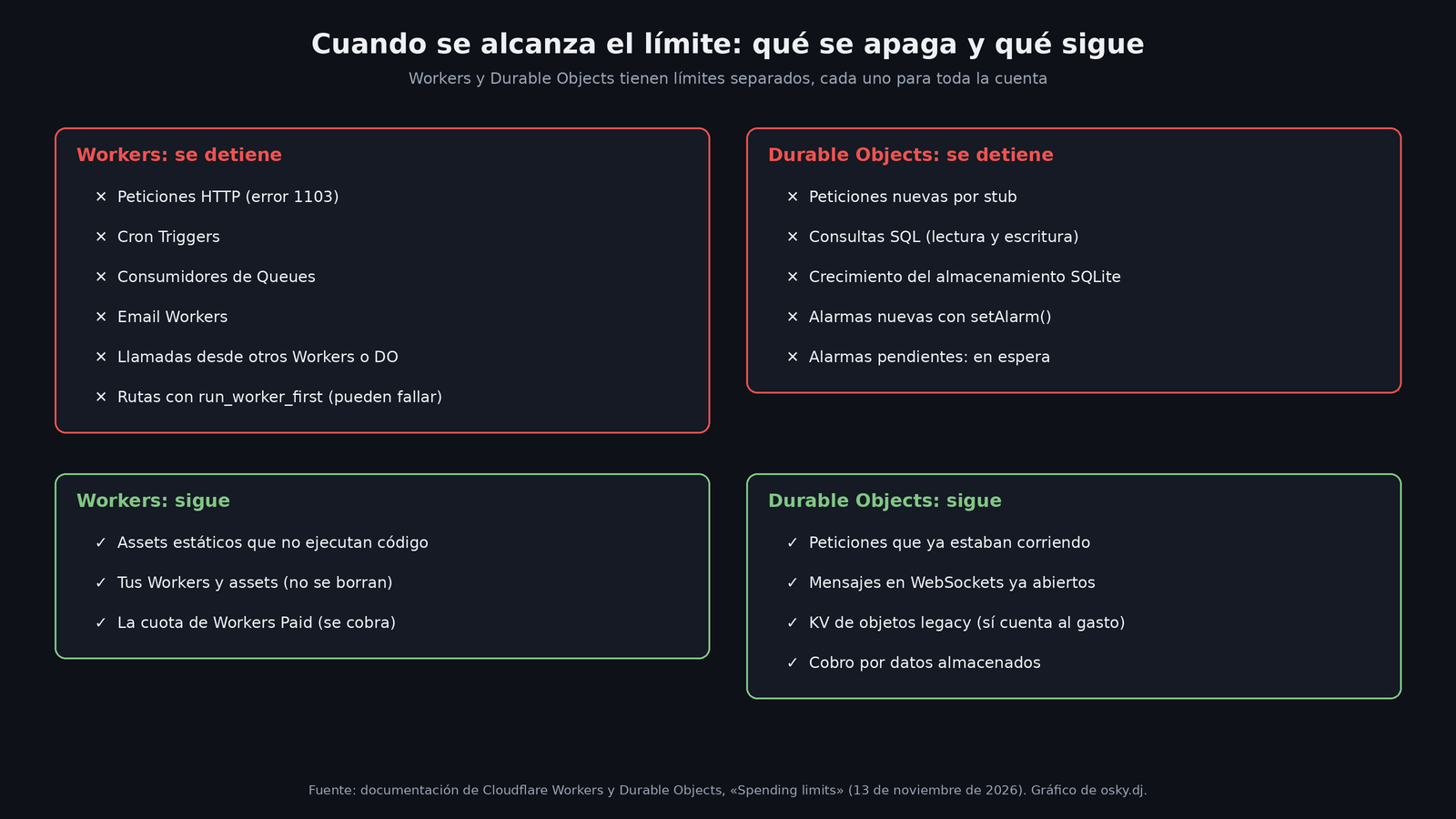
In Workers, once the limit takes effect, new invocations are rejected: HTTP requests (the visitor sees error 1103), Cron Triggers, Queues consumers, Email Workers, and calls from other Workers or Durable Objects. Rejected requests are not billed as invocations. Static assets served without running your Worker remain available, but anything that needs code (for example, routes with run_worker_first) may fail. Nothing gets deleted.
In Durable Objects, new requests per stub, SQL queries (read and write), SQLite storage growth and new alarms via setAlarm() are rejected. Pending alarms wait until the block ends, subject to a seven-day limit, and those waits don't consume their normal retries. What doesn't stop: requests that were already running (they keep generating duration charges), messages on already-open WebSockets, operations on legacy objects with key-value storage (which do count toward spending), and charges for stored data.
To resume there are three paths: raise the limit above what's been spent, turn the limit off, or delete it. Changes take a few minutes. If you do nothing, the block expires on its own when the next billing period starts, and the limit stays configured for the new cycle.
The fine print: it's not a maximum bill
Cloudflare says it plainly in its documentation: a spending limit is not an exact maximum amount. Spending is visible almost in real time, with under 10 minutes of delay, and there's always a gap between measuring and blocking. Measurement delays, in-flight operations and even failures in enforcing the block can make you overshoot. Also, the dashboard saying "Limit reached" doesn't confirm the block has already propagated across the whole network.
The reason lies in how they built it, and the announcement explains it in detail:
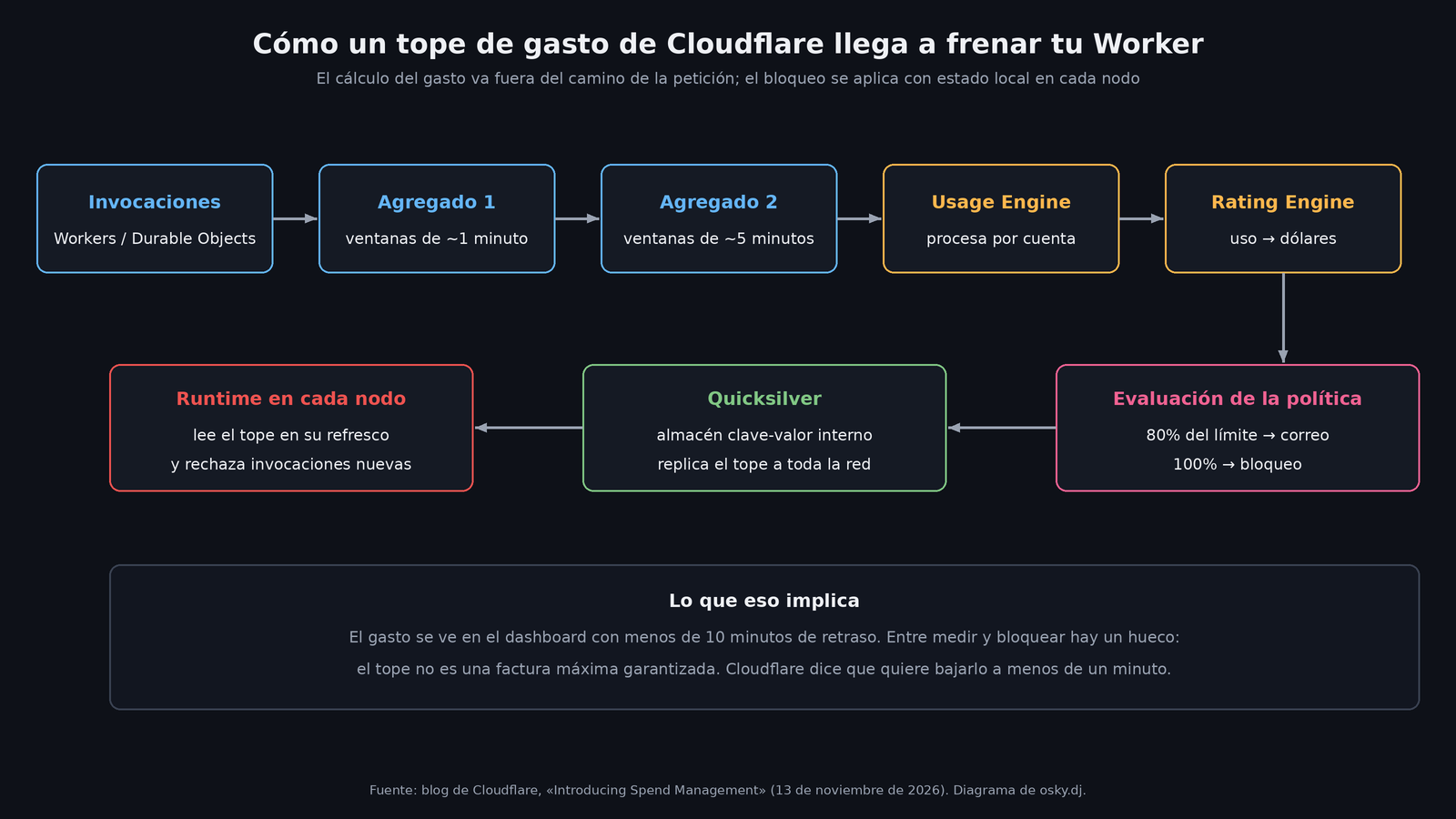
- Each invocation generates measurements (requests, CPU, duration, storage operations) that are aggregated close to the source in two stages: first in windows of about one minute and then in windows of about five.
- A Usage Engine turns those measurements into usage records and processes everything partitioned by account, with a write-ahead log (WAL) on disk to recover if a processor fails.
- The Rating Engine cross-references usage, subscription and pricing to answer how much the account has spent. If usage arrives before the subscription data, it leaves it pending instead of treating it as free.
- The block isn't decided in the request path: the policy is published to Quicksilver, Cloudflare's internal key-value store, and each node's runtime picks it up on its periodic refresh. That way no request waits on the billing engine, but the brake arrives with a delay.
Cloudflare says it wants to bring that gap between measurement and blocking down to under a minute.
What's coming
The announcement previews three fronts: more products with limits, less latency, and budgets per application or per agent. The last one is the interesting one: today the limit is per product, but Cloudflare envisions being able to tag an AI agent's calls and pause only that task or that application, without taking down everything else in the account. For what already exists in AI, the company recommends combining it with AI Gateway spend limits, which allow budgets per user, model or provider (up to 20 rules per gateway) and respond with a 429 when the budget runs out.
My take
It's good news, and overdue. Anyone who has watched a cloud bill skyrocket because of a loop or a bot that found your endpoint knows an email at three in the morning doesn't help much. But the current design has two risks worth keeping in mind before you pull the brake:
- It's a general switch, not per project. The documentation itself warns about it: a test Worker can hit the shared limit and take down the production Worker in the same account. If you mix staging and production in a single account, an aggressive limit can turn a cost problem into an outage. Separating accounts, or setting the limit with a wide margin, stops being optional.
- Pausing is also a business decision. For a personal site or a weekend project, shutting off is better than paying. For something that earns revenue, a 1103 in the middle of a campaign can cost more than the overage. In that case, the 80% alert (which doesn't block) may be the right tool, and the hard limit an insurance policy set higher up.
My practical recommendation: turn on the email alerts first, watch a couple of cycles to see how much you really spend, and then set the hard limit with a cushion. And don't forget to add an email to the limit, because the dashboard won't do it for you.
Sources
- Cloudflare: "Introducing Spend Management: Spending limits and alerts for Cloudflare" (November 13, 2026)
- Cloudflare documentation: Spending limits and alerts
- Cloudflare Workers documentation: Spending limits
- Cloudflare Durable Objects documentation: Spending limits
- Cloudflare documentation: Budget alerts
- Cloudflare AI Gateway documentation: Spend limits