/en/articles/whatsapp-direct-send-no-longer-adds-the-copy-code-button-to-otps-on-its-own-now-you-have-to-declare
WhatsApp Direct Send no longer adds the "copy code" button to OTPs on its own: now you have to declare it
Since October 27, 2026, Direct Send no longer detects the OTP in text authentication messages or adds the copy code button on its own. To get the button, you have to send an interactive message with the code in otp.code.

If you send verification codes over WhatsApp with Direct Send and relied on Meta to "guess" the code inside a text message so it could add the copy button, that's over. On October 27, 2026, Meta noted in the WhatsApp Business Platform changelog that it deprecated, by default, automatic OTP inference and copy code button generation for text authentication messages sent with Direct Send. The official alternative is explicit: send an interactive authentication message and put the code yourself in the otp.code field. For anyone running login bots, account verification, or payment confirmation, the difference shows up in the user experience and in how long it takes users to type the code.
What exactly changed
Direct Send is the Cloud API mode that lets you send business-initiated messages, utility or authentication, without creating templates first. You add a category field to the normal /<PHONE_NUMBER_ID>/messages call, and Meta generates and matches the templates behind the scenes.
The October 27 changelog entry is short. Meta says it "deprecated automatic OTP inference and copy code button generation" for Direct Send text authentication messages, "by default." The supported message types page, updated the same day, makes it clearer: Direct Send no longer infers an OTP from a text message or adds a copy code button on its own. If you want the button, you have to use the interactive authentication message and declare the code.
In practice:
- A message with
"type": "text"and"category": "authentication"still gets sent, but it arrives as plain text, with no copy button. - If you want the button, the message has to be
"type": "interactive"with a button of typeotp.
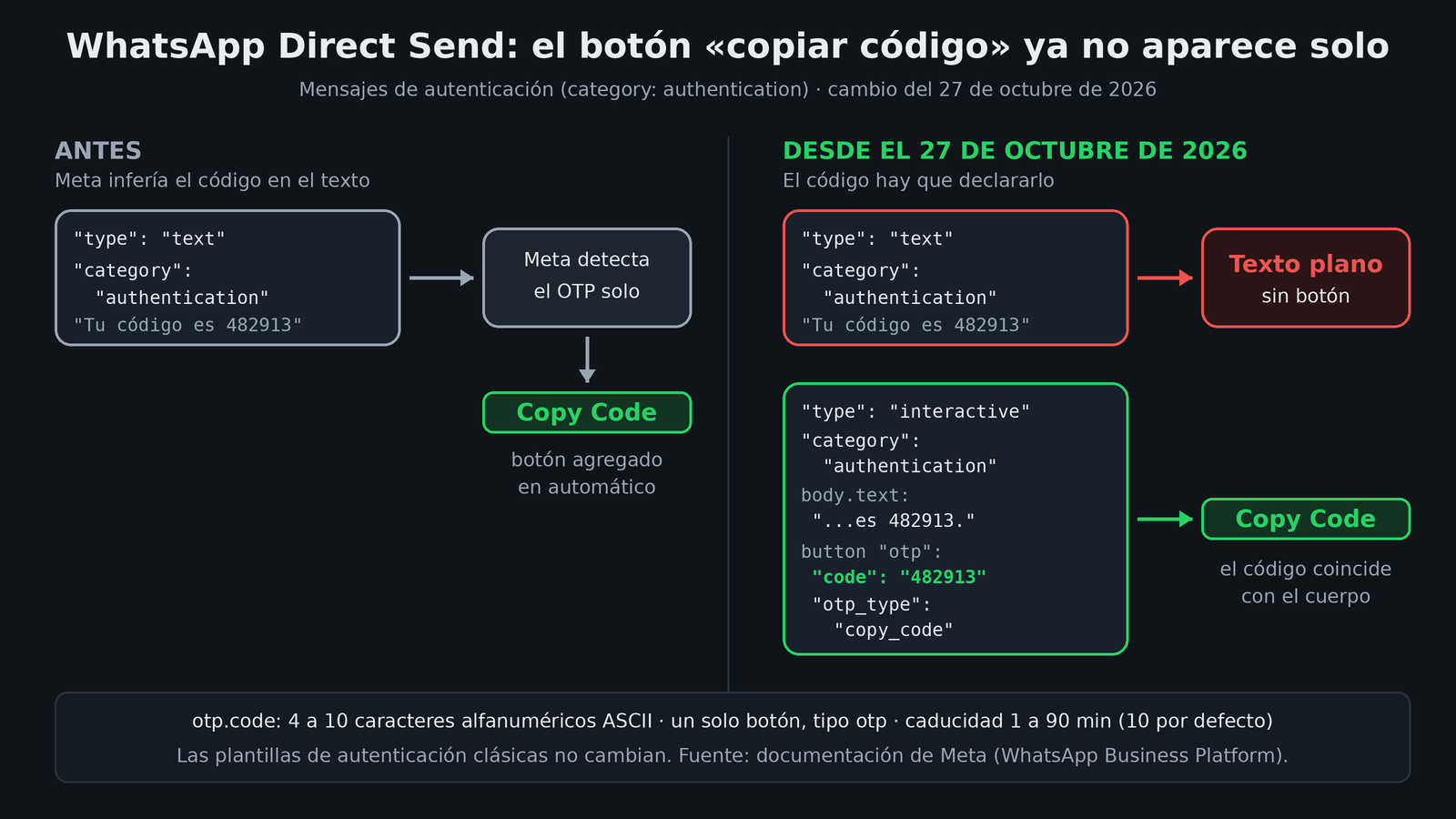
The alternative: interactive authentication messages
Support for these messages arrived two weeks earlier. On October 14, 2026, Meta added interactive OTP to Direct Send authentication messages, to deliver the copy code experience "without creating an authentication template first." Direct Send creates and uses the template for you.
The requirements, according to the documentation:
| Field | Rule |
|---|---|
category (top level) |
authentication |
type / interactive.type |
interactive / button |
| Buttons | Exactly one, of type otp |
otp.code |
4 to 10 ASCII alphanumeric characters; the same code must appear as a standalone value in interactive.body.text |
otp.otp_type |
Required, only accepts copy_code |
otp.text |
Optional, button label; defaults to Copy Code, max 25 characters, no emojis, URLs, line breaks, or variables |
otp.code_expiration_minutes |
Optional, 1 to 90 minutes; defaults to 10 |
| Recipient | to with a phone number; authentication messages don't accept business-scoped user IDs |
The body of a minimal request looks like this (adapted from the official example):
{
  "messaging_product": "whatsapp",
  "recipient_type": "individual",
  "to": "<NUMERO_DEL_USUARIO>",
  "type": "interactive",
  "category": "authentication",
  "interactive": {
    "type": "button",
    "body": { "text": "Tu código de verificación es 482913." },
    "action": {
      "buttons": [
        {
          "type": "otp",
          "otp": {
            "code": "482913",
            "otp_type": "copy_code",
            "text": "Copiar código",
            "code_expiration_minutes": 10
          }
        }
      ]
    }
  }
}
I haven't tested this; it comes from Meta's official documentation. There are two details that are easy to miss: the code has to be literally in the body text, as a standalone value, and only one button is allowed. You can't mix the OTP button with reply or URL buttons in the same message.
Who this hits
Fewer people than it seems, but it hits them directly.
Direct Send for authentication is still in alpha with restricted access. The main Direct Send page describes it as alpha and asks you to fill out an interest form. The category field reference says that to use authentication you have to request access from your partner or client manager. The July 31 changelog, when utility Direct Send went generally available, said authentication "is still in beta." The labels don't match across pages, but the conclusion is the same: it's not open to everyone.
In other words, this change mostly affects:
- Businesses and BSPs that have already joined the Direct Send authentication program and send OTPs as plain text.
- Integrations that assumed the button would show up on its own because the text contained something that looked like a code.
If you send your OTPs with classic authentication templates (the ones you create with the Message Templates API, with an otp button of type copy_code), this change doesn't affect them. The changelog entry only talks about Direct Send.
What to do if you already use it
- Search your code for sends with
"category": "authentication"and"type": "text". Those are the ones that lost the button. - Migrate to the interactive format: move the text to
interactive.body.text, put the code inotp.code, and check that it appears identically in the body. - Validate the code before sending it: 4 to 10 ASCII alphanumeric characters. If your generator includes symbols (classic templates accept things like
J$FpnYnPin their example), adjust it for Direct Send. - Check the recipient: if you migrated to business-scoped user IDs in other flows, authentication still requires a phone number in
to. - Adjust the expiration: if you don't send
code_expiration_minutes, it defaults to 10 minutes.
Also keep in mind what Meta added on October 15: Direct Send messages are subject to portfolio pacing. A throttled message can be held or dropped, and a drop only reaches you through the status webhook (failed, error 135000). For an OTP, a held message is almost as useless as a dropped one, so it's worth keeping an eye on that webhook.
My take
My take is that Meta is trading magic for a contract. Automatic inference was convenient but ambiguous: it let a system decide which part of your text was "the code." If it got it wrong, the user copied the wrong thing. With otp.code, the developer declares the data and Meta just checks that it matches the body. It's less magical and more predictable, which is what you want in a login flow.
I also find the order revealing: first, on October 14, the interactive format ships, and thirteen days later the implicit behavior is switched off. It's the classic "you now have an alternative, so use it" sequence. What the documentation doesn't say is whether the "by default" implies that some accounts can re-enable inference. I didn't find any documented option for that, so I wouldn't count on it.
Sources
- WhatsApp Business Platform: changelog (October 27, 2026)
- Direct Send: supported message types, interactive authentication messages
- Direct Send: eligibility and how it works
- Direct Send: sending utility and authentication messages
- Direct Send: supported features and limits
- Authentication templates with copy code button