/en/articles/twilio-lets-you-bid-on-your-whatsapp-marketing-templates-max-price-reaches-ga-but-only-in-dollars
Twilio lets you bid on your WhatsApp marketing templates: Max Price reaches GA, but only in dollars
Twilio released Max Price for WhatsApp marketing templates: you set a maximum price per delivery and Meta charges that or less. It only applies to USD accounts (MXN not yet), requires accepting the Marketing Messages API terms, and on Meta's side the feature is still in beta.

On November 17, 2026, Twilio announced general availability of Max Price for WhatsApp marketing templates. The idea is simple to state and not so simple to operate: instead of paying the flat rate Meta publishes per country, you set the maximum price you're willing to pay for each delivered message, and Meta charges you that or less. For anyone sending WhatsApp campaigns from a bot or a CRM connected to Twilio, the cost of a marketing template stops being a number in a table and becomes a bid. There's important fine print, especially for Mexico: at launch it only works on accounts billed in dollars, and on Meta's side the feature is still marked as beta.
What Twilio announced
According to the Twilio changelog, Max Price lets you "bid the highest rate" you're willing to pay for Marketing-category templates, and Meta charges each delivered message at that rate or below. Twilio suggests three uses: set the bid equal to your current rate, lower it in quiet seasons, or raise it in peak seasons. It's optional and coexists with flat-rate sending, so you're not forced to migrate anything.
There are two entry requirements:
- Accept the terms of service of Meta's Marketing Messages API. Max Price doesn't live in the regular Cloud API, but in that other Meta API for marketing messages.
- A dollar account. At launch it only applies to Twilio accounts and WhatsApp Business Accounts (WABAs) billed in USD. Twilio says other currencies will come later.
How the bidding works
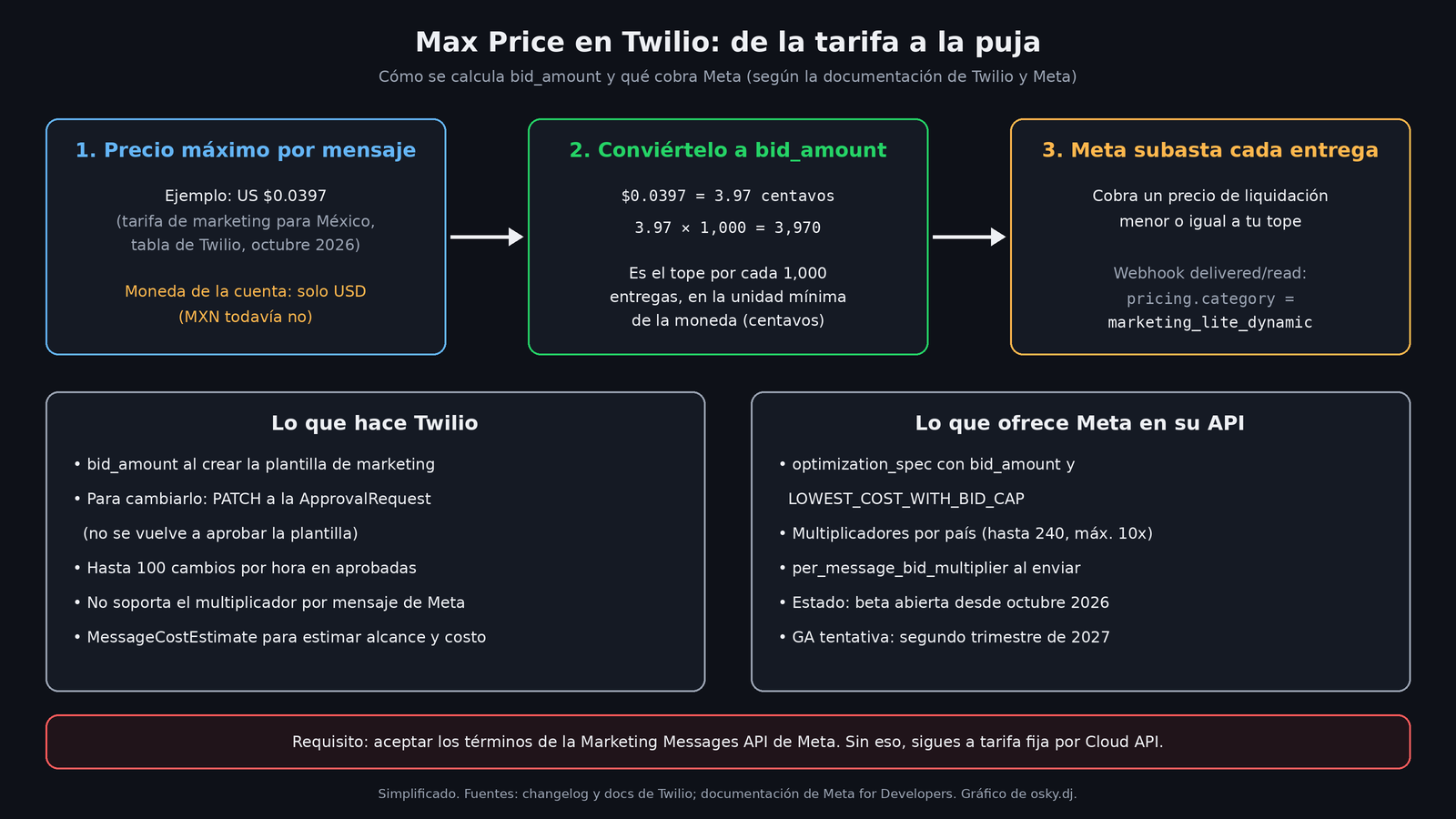
Twilio's documentation describes Max Price as dynamic auction pricing. You send a bid_amount, and for each delivery attempt Meta calculates a "settlement price" based on market conditions. That price is always less than or equal to your bid.
The bid_amount is not written in dollars, and it's easy to get wrong:
- Convert the price per message to the currency's minimum unit (US cents).
- Multiply it by 1,000, because the value represents the cap per 1,000 deliveries.
Twilio publishes a reference table with the flat marketing rates Meta published in October 2026, already converted. Some values for the region:
| Market | Flat rate per message (USD) | Equivalent bid_amount |
|---|---|---|
| Mexico | $0.0397 | 3970 |
| North America | $0.0250 | 2500 |
| Colombia | $0.0125 | 1250 |
| Brazil | $0.0625 | 6250 |
| Argentina | $0.0618 | 6180 |
| Peru | $0.0703 | 7030 |
| Chile | $0.0889 | 8890 |
| Rest of Latin America | $0.0740 | 7400 |
If you bid 3970 for Mexico, you're telling Meta not to charge you more than what you were already paying at the flat rate. If you bid 5000, you accept paying up to five cents per delivery in exchange for, in theory, getting more delivered.
What changes in your integration
In Twilio, templates are managed with Content Templates. The bid_amount is included when you submit a MARKETING-category template for approval. According to the Content API reference, you can later change it with a PATCH to https://content.twilio.com/v1/Content/{ContentSid}/ApprovalRequests/whatsapp, and it's the only field you can update there.
The limits Twilio documents:
- Approved templates: up to 100 bid changes per hour (2,400 per day), without going through Meta's approval again.
- Paused or rejected templates: unlimited changes.
- Templates under review: can't be edited.
- Per account: the
PATCHis limited to 20 requests per second. - The bid is only configured via API, not from the console.
The difference with Meta that matters most: Twilio doesn't support the per-message bid multiplier that Meta's API offers. In Meta's documentation, you can set a high bid on the template and lower it when sending each message with per_message_bid_multiplier, or adjust it by country with bid_country_multiplier_overrides (up to 240 countries and a maximum multiplier of 10). In Twilio, the only lever is editing the template. If you wanted to bid differently depending on the customer segment, you'll need separate templates or lots of PATCH calls. Heads up: Meta warns that a bid change can take up to an hour to propagate and that performance may dip in the meantime.
So you're not bidding blind, Twilio exposes Meta's reach estimation tool through its MessageCostEstimate API. You give it the destination country and a historical window (1, 7, 14 or 28 days), and it returns ranges of deliveries and cost per 1,000 users. Meta makes clear that these estimates come from historical data and guarantee nothing.
Twilio also claims that Max Price "eliminates marketing frequency caps" that normally limit how many times you can contact the same user. If that's confirmed in practice, it's probably the most consequential change in the announcement, and also the easiest to abuse: the system letting you send more doesn't mean the customer wants to receive more.
The catches: currency, beta and billing
Mexico in pesos is left out, for now. Twilio's eligibility table is clear: USD available; BRL, EUR, GBP, AUD and MXN "not yet supported"; JPY not supported because Meta doesn't bill in yen. Also, the currency of a Twilio account or an existing WABA is permanent. Twilio says that to change it, you have to create a new account and provision another WABA. For a Mexican company that bills in pesos, the practical recommendation is to wait for MXN to arrive instead of rebuilding your whole account to try out a new feature.
The "GA" is Twilio's, not Meta's. Meta's page is still titled "Set a max price for marketing messages (BETA)". Its timeline shows a limited beta from May 15, 2026, an open beta from October, and "tentative" general availability for the second quarter of 2027. Meta describes the feature as "early stage" and warns that its performance may vary while its systems learn. My take: Twilio now formally supports it in its product, but the underlying auction is still being tuned by Meta, and today's results may not look like those six months from now.
Separate billing. Since November 1, 2026, according to Meta's billing guide, max price messages appear as a separate line on the invoice ("Price type: Max Price"). In the delivered and read webhooks, pricing.category arrives as marketing_lite_dynamic instead of marketing_lite, and Meta adds a cost object with the estimated charge for the message. If your bot or your cost dashboard filters by pricing category, check it before turning on Max Price, or those messages won't show up in your reports.
New errors. Meta documents that sending a max price template through the Cloud API's /messages endpoint fails with error 131061; that sending it to a country where the feature isn't available gives 131065; and that, with the Marketing Messages API, those templates can't be sent to a username-based user identifier (BSUID), only to a phone number (error 131062). If your bot already handles WhatsApp users with usernames, that detail matters.
How to test it without burning budget
I haven't tested it; this comes from Twilio's and Meta's official documentation. Meta recommends starting with four-arm A/B tests of about 10,000 sends each, with similar audience and timing:
- A: no max price.
- B: max price equal to the flat rate.
- C: 1.5 times the rate (1.2 in India and Saudi Arabia).
- D: 0.9 times the rate.
It also suggests ramping up volume gradually with each new template. For a small business that sends a few hundred promotions a month, 40,000 test sends is a lot. The honest read here is that Max Price is designed for those who already run large campaigns and have data to compare delivery against cost. If your WhatsApp bot mostly sends utility templates (confirmations, reminders), this doesn't concern you: it only applies to the Marketing category.
If you do send marketing at volume and your account is in dollars, the reasonable first step is arm B: bid exactly your current rate. You shouldn't pay more than today, and it lets you see how the auction behaves with your own numbers before playing with more aggressive bids.
Sources
- WhatsApp Max Price is now GA, Twilio changelog (November 17, 2026)
- Key Concepts: WhatsApp Max Price, Twilio documentation
- Content API Public Endpoints: Update the bid amount of a template, Twilio
- Set a max price for marketing messages (BETA), Meta for Developers
- Max price billing SKU: Invoice and analytics API updates, Meta for Developers
- Pricing on the WhatsApp Business Platform, Meta for Developers