/en/articles/twilio-conversation-relay-can-now-survive-a-redeploy-without-dropping-the-call-reconnection-live
Twilio Conversation Relay Can Now Survive a Redeploy Without Dropping the Call: Reconnection, Live Configuration, and ElevenLabs v4
Twilio moved four Conversation Relay features for AI voice bots to GA: changing language and voice mid-call, reconnecting the WebSocket after a redeploy without losing the call, filtering the agent's own echo, and using ElevenLabs v3 and v4 Turbo.

On October 28, 2026, Twilio announced in its changelog that Conversation Relay, its service for connecting phone calls to AI agents over WebSocket, is adding four capabilities in general availability (GA): dynamic configuration mid-call, automatic reconnection for your application, filtering of the agent's own echo, and support for ElevenLabs' v3 Conversational and v4 Turbo voice models. Mind the nuance: what goes GA is these features, not the whole product. If you already have a voice bot built on <ConversationRelay>, this touches three classic headaches: the agent that can't switch languages without hanging up, the call that dies when you redeploy your container, and the bot that interrupts itself because it hears its own voice coming out of the customer's speaker.
Honest heads-up before going on: I haven't tested it. Everything below comes from Twilio's changelog and official documentation, linked at the end.
What Conversation Relay is, in two lines
According to Twilio, <ConversationRelay> is a TwiML noun that goes inside <Connect> and sends the call to a service that handles the ugly parts of real-time voice: speech recognition (STT), synthesis (TTS), session management, and low-latency communication with your application. Your server receives what the person said, already transcribed, over WebSocket and replies with text, which Twilio turns into speech. You bring the brain (your LLM, your business logic) and Twilio brings the phone.
1. Changing the configuration without hanging up
Until now, whatever you defined in the TwiML when the call started was basically what you were stuck with until the end. With dynamic configuration, your application sends a config message over the same WebSocket and changes almost everything on the fly. Twilio's guide lists what you can touch:
- Per language: recognition model,
hints, transcription provider, voice, TTS provider, and text normalization. - Session-level:
interruptible,preemptible,dtmfDetection,reportInputDuringAgentSpeech,partialPrompts,speechTimeout,echoPromptFiltering,interruptSensitivity,ignoreBackchannel,profanityFilter, andeotThreshold. - The active language: you can change the voice language and the transcription language separately, and even add a language the TwiML didn't declare, as long as you send its complete configuration (
ttsProviderandvoice;transcriptionProviderandspeechModel). Twilio clarifies that in that case it doesn't fill in default values.
There are also shortcuts: a hints message to update recognition hints and a language message to switch languages. And if you only want one response to come out in another language (a proper name, a phrase for someone who switched languages for a moment), you mark the text tokens with lang instead of changing the language for the whole session.
What you can't change mid-call: the WebSocket URL, the welcome greeting, the event subscription, the links to Conversation Intelligence and Conversation Orchestrator, and the applicationReconnect and partialPromptOnHangup attributes. For those you have to open a new session.
There are three operational details worth knowing before you code:
- Updates are atomic. If a single value in the message is invalid, Twilio rejects the whole message and the call continues with the previous configuration.
- Not everything lands at the same time.
partialPromptsandreportInputDuringAgentSpeechapply immediately. Recognition settings wait until the person finishes their turn. Voice settings apply to the next text you send, so a change mid-response splits the sentence into two voices. Twilio recommends sending them between responses. - Optional confirmation. If you subscribe to the
config-updatedevent, Twilio sends you aconfigUpdatedmessage when the change actually takes effect. Ten invalid messages in a row close the connection, and there is a rate limit, so no resending configuration in a loop.
My take: this is what makes it possible for a voice agent to behave like a chat one. For example, detecting that the person is speaking English and switching, adding hints with billing vocabulary when the conversation gets to payments, or turning on DTMF tone detection only at the step where they ask for the customer number. Before, that was solved by declaring everything up front or with some juggling.
2. Automatic reconnection: so a redeploy doesn't kill the call
This is the one that production operators will like most. Twilio says it bluntly: the WebSockets between your app and Conversation Relay drop because of autoscaling, container redeploys, or load balancer recycling. Before, that meant a lost call. Now, with applicationReconnect="true" in the TwiML, the service rides out the drop and reconnects.
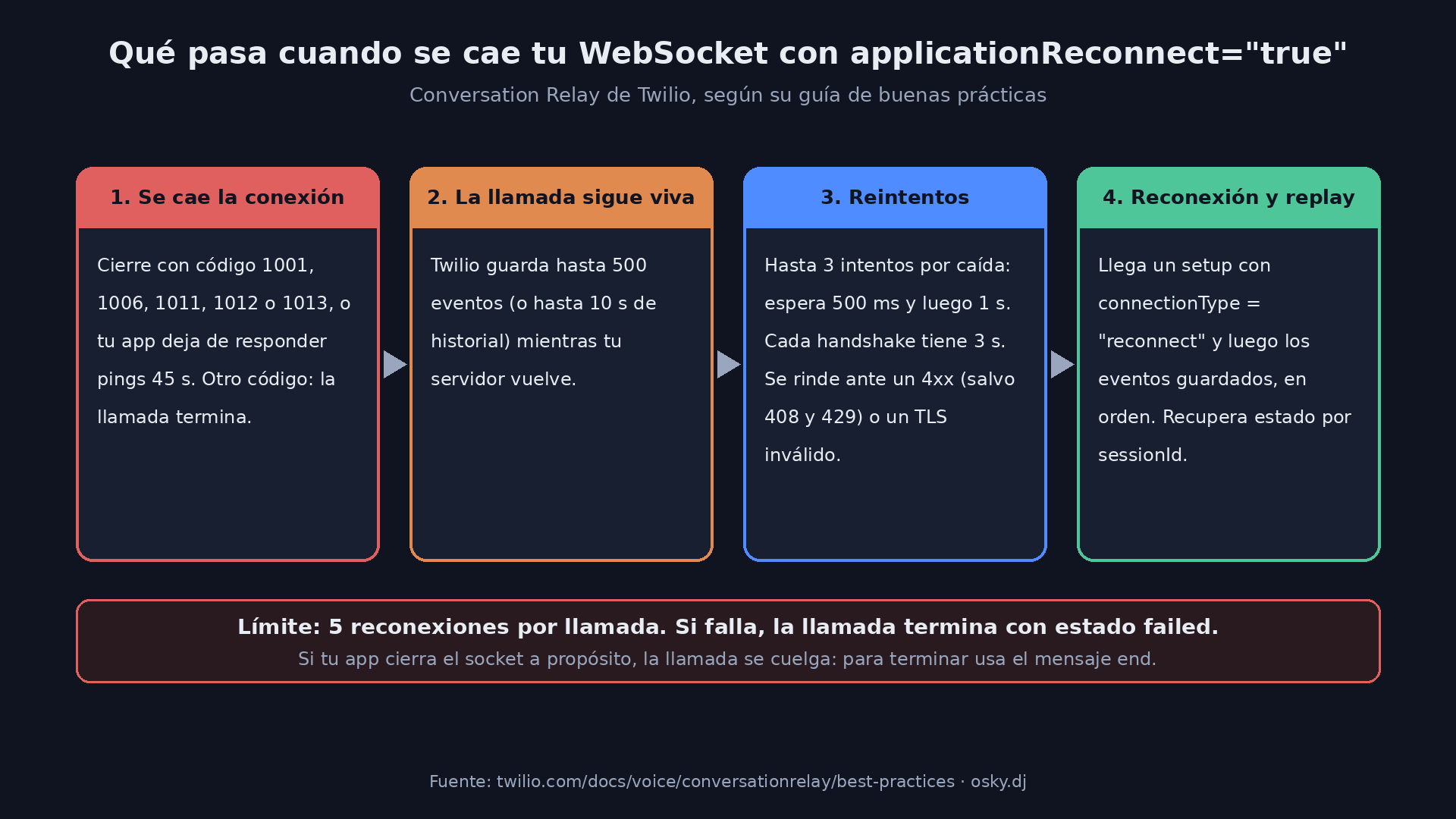
According to the best practices guide, this is how it works:
- When it reconnects: if the WebSocket closes with code 1001, 1006, 1011, 1012, or 1013, or if your application stops answering pings for 45 seconds. Any other close code ends the call.
- What it stores: up to 500 incoming events (or up to 10 seconds of history) while your server comes back.
- How it retries: up to 3 attempts per drop, waiting 500 ms and then 1 second between them, with 3 seconds for each handshake. It stops immediately if your server answers with a 4xx other than 408 or 429, or if the TLS certificate is invalid.
- How many times: a maximum of 5 reconnections per call. If it fails, the call ends with a
failedstatus. - What your app receives: a
setupmessage withconnectionTypeset to"reconnect"and, right after, the stored events in order.
The catch: reconnection doesn't restore your state. Twilio suggests saving the conversation context in a shared cache like Redis, with the sessionId as the key, and retrieving it when the reconnect setup arrives. If your bot keeps its history in process memory, the user is going to feel like they're talking to someone who just woke up. Also, reconnection covers network drops and server restarts, not closures you cause yourself. If your app closes the socket on purpose, the call ends. To hang up properly you need to send the end message.
And one detail from the TwiML reference: the default value of applicationReconnect is false. It doesn't turn itself on. If you want the benefit, you have to enable it.
3. Echo filtering: so the bot doesn't interrupt itself
Anyone who has tried a voice bot with someone on speakerphone knows the problem: the agent's voice leaks into the microphone, recognition transcribes it, and the agent interrupts itself or answers its own sentence. The new echoPromptFiltering="true" attribute removes from the transcript the words that match what the agent just said. According to the reference, the STT provider still receives all the audio; the filter works with the per-word timings delivered by the TTS provider. That's why Twilio recommends ElevenLabs if you're going to use it: it provides per-word timings and improves accuracy. It's off by default and can be turned on in the TwiML or with a config message mid-call.
4. ElevenLabs v3 and v4 Turbo: goodbye SSML
The fourth novelty is support for ElevenLabs v3 Conversational and v4 Turbo. The voice documentation recommends v4 and credits it with a median inference latency of around 100 ms and more than 90 languages with native accents. You enable it by adding the model to the voice ID: <VOICE_ID>-v4 or <VOICE_ID>-v4_turbo.
The change that can break things if you migrate without reading:
- v3 and v4 don't support SSML. Instead of
<break>and company, they use natural-language audio tags in square brackets, like[whispering],[sighs], or[fast], inside the text you send. - There's no numeric speed control. If your voice string carries a
speedother than1.0, Conversation Relay rejects it. You have to remove it or leave it at1.0and control the pace with tags like[fast]or[briskly]. - Twilio warns that there's no fixed list of tags: the model interprets whatever you put and, if it doesn't understand it, ignores it without returning an error. And it asks you not to end responses with something like
[neutral], because the model may read it out loud.
What I'd do with a voice bot in production
My take, in priority order:
- Enable
applicationReconnectand move the conversation state to Redis or similar, with thesessionIdas the key. It saves the most calls and asks for the least code. - Review how you close the socket. If today you hang up by closing the connection, switch to
endmessages, because with reconnection on the difference matters. - Try
echoPromptFilteringif your users talk from the car or on speakerphone. - Migrate to ElevenLabs v4 calmly: search for SSML and
speedin your prompts and your code before changing the voice suffix. - Use dynamic configuration where today you have giant TwiML files with every language and case declared up front.
What I still don't know: the changelog doesn't mention pricing changes for using these features, and the documentation doesn't detail the rate limit for config messages either. Before designing something that sends configuration very frequently, you'll need to ask Twilio.