/en/articles/lock-down-your-github-actions-how-workflow-lockfiles-work
Lock Down Your GitHub Actions: How Workflow Lockfiles Work

Every time your workflow says uses: someone/action@v3, you're signing a blank check to whoever controls that tag. Git tags can be moved, and if a maintainer's account gets stolen, the v3 you reviewed six months ago could point to malicious code tomorrow, running with your secrets inside. That's what workflow lockfiles are for: GitHub declared them generally available on October 28, 2026 for the Free, Team, and Enterprise Cloud plans. The topic came back into the conversation this week thanks to a practical guide by Hugo van Kemenade that got over 300 points on Hacker News. Here's what it is, how to adopt it, and what it doesn't solve. Heads-up upfront: I haven't tried it myself; this comes from GitHub's official documentation, the tool's repository, and van Kemenade's post.
The problem: a tag is not a promise
According to GitHub's documentation, when a workflow references an action by tag or branch (@v3, @main), GitHub Actions resolves that reference at run time, to whatever commit it points to at that moment. If the tag moves, the code that runs is no longer the code someone reviewed. This isn't theory: the attack on tj-actions/changed-files worked exactly like this, repointing tags that used to be safe.
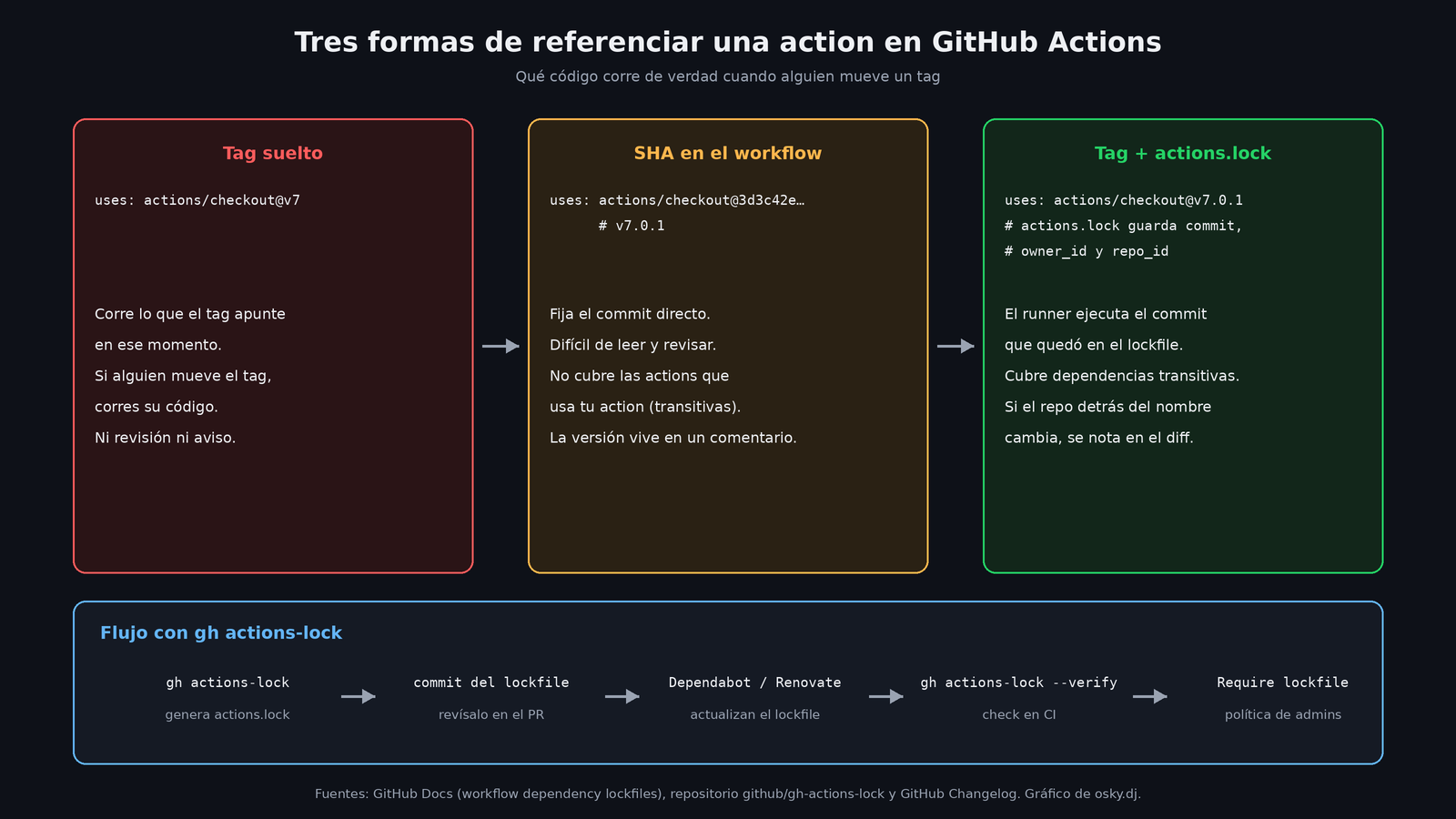
Until now the recommendation was to pin every action to a full 40-character SHA, with the version in a comment. It works, but it has three problems: the workflow becomes unreadable, nobody enjoys reviewing a diff of hashes, and above all, it doesn't cover transitive dependencies: if your pinned action internally uses another action with @v1, that one is still floating.
What actions.lock is
The lockfile lives at .github/workflows/actions.lock, is generated by the gh-actions-lock extension for the GitHub CLI, and, according to GitHub, is never edited by hand. It has two sections:
workflows: which dependencies each workflow you've already adopted uses.dependencies: which commit each one was resolved to, with itsref(the original tag or branch), its exactcommit, and the numericowner_idandrepo_idof the source repository.
That last detail is the cleverest part of the design. With those IDs, GitHub confirms at run time that the repo behind the name is still the same one you pinned. If someone deletes a repo and someone else registers the same name, GitHub detects it at run time, and if you regenerate the lockfile the change in IDs shows up in the diff. In addition, the pinned commit has to be reachable from the branch or tag recorded in the action's repo; a commit that only exists in a fork is rejected.
Once a workflow enters the lockfile, all of its dependencies have to be there, and the runner executes the recorded commit even if the tag has moved. GitHub says on its concepts page that, for repos that adopt the lockfile, pinning SHAs inside the workflow is "no longer necessary." The lockfile also satisfies the policy of pinning actions to a full SHA.
How to adopt it, step by step
This is what GitHub's guide and van Kemenade's post describe; he applied the change in repos like Pillow and CPython:
- Review your references. Before pinning anything, confirm that every
uses:points to a current version: the lockfile freezes whatever is there today, good or bad. GitHub recommends enabling Dependabot for actions before generating the lockfile. - Install the extension:
gh extension install github/gh-actions-lock. It requires an authenticatedghand works with github.com and Enterprise Cloud with data residency (*.ghe.com); GitHub Enterprise Server is not supported. - Generate the lockfile from the repo root with
gh actions-lock. You can adopt a single workflow by passing its path, for examplegh actions-lock .github/workflows/ci.yml. - Review the full diff. The tool doesn't just create
actions.lock: it also rewrites youruses:. A reference like@v3becomes@v3.1.0, and the SHAs you had pinned go back to readable tags. In van Kemenade's example,actions/checkout@3d3c42e… # v7.0.1becameactions/checkout@v7.0.1. - Commit the modified workflows and the lockfile.
One detail that can break your CI: if your organization only allows a list of actions, after adopting the lockfile the list is compared against the pinned SHAs, not against the tags. An entry like actions/checkout@v6 stops matching; GitHub asks you to use wildcards or the full SHA.
Keeping it alive
A lockfile nobody updates becomes a nuisance within two weeks. The pieces the ecosystem offers:
- Dependabot: when it bumps the version of an action in an adopted workflow, it regenerates the lockfile entry in the same pull request, with no extra configuration. Heads-up: it doesn't adopt new workflows; it only maintains what's already inside.
- Renovate: also supports
actions.lock. - Verification in CI:
gh actions-lock --verifywrites nothing and blows up if the lockfile is out of date or if a pinned commit no longer verifies against its origin. GitHub publishes averify-lockfile.ymlready to copy. Van Kemenade added it as a separate job inside his lint workflow, on the lightweightubuntu-slimrunner, pinning the extension with--pin v0.4.1. - Pre-commit mode:
--verify-localchecks without network access that everyuses:has an entry, but the README clarifies that it only measures coverage, not provenance. - When a tag moves: with branches or partial versions (
main,v3) the tool keeps the pinned commit and warns withref-moved; with a full tag (v3.1.0) that moved, it flags an error. In both cases you move forward with--relock, after reviewing what changed upstream. If history was rewritten, there's--accept-moved, which GitHub says to never use in automation.
And the human part, which GitHub states bluntly in its guide for administrators: a lockfile "is only a security control if someone reads the diff." It recommends putting actions.lock in CODEOWNERS, requiring code owner approval, and treating every changed commit like a version bump of any other dependency. A different owner_id or repo_id should be extremely rare and warrants investigation before the merge.
For organizations: the "Require lockfile" policy
Enterprise, organization, or repository administrators can enable the Require lockfile policy, which blocks workflows that aren't in their repo's lockfile, even those that don't use any action. GitHub recommends starting in Evaluate mode and checking Policy insights before switching to Active, although that evaluation mode only exists on Enterprise Cloud. If your workflows call reusable workflows from another repo, that repo also has to be adopted, or the policy blocks the run.
What the lockfile doesn't do
GitHub is honest about the limits, and it's worth keeping them clear:
- It doesn't decide whether a dependency is safe. The changelog says it plainly: review dependencies before pinning them. If you pin a compromised action, you've pinned the problem.
- It doesn't pin reusable workflows called with
jobs.<id>.usesfrom another repo. For those, the full SHA is still the way to go. - It doesn't pin container images; the tool warns if they don't come with an
@sha256:digest. - It doesn't follow local actions (
./…) that in turn use remote actions, unless you migrate them with--migrate-local-actionsto the new$/…syntax. - It doesn't cover secrets, parameters, or the runner image: only the code of the actions.
- According to the README, if someone moves a floating reference (
v4,main) back to an older commit in its own history, it isn't detected. Pin full tags and read the diffs.
The tools around it
zizmor, the security linter for GitHub Actions that van Kemenade "strongly" recommends, added experimental lockfile support in version 1.32.0 (November 2). Earlier versions will keep asking you to pin SHAs, so update it along with everything else.
And if you're reviewing your Actions security anyway, there's another change with a date on it: starting December 2, 2026, GitHub will block by default the pull_request_target trigger on all public repos, unless a policy explicitly allows it. It does this because that event runs with access to the base repo's secrets and can execute code from forks. GitHub scheduled two test blackouts, on November 9 and 16 from 16:00 to 18:00 UTC. Private and internal repos are not affected.
My take
This is the package-lock.json GitHub Actions should have had from day one. The valuable part isn't pinning commits, which was already possible, but doing it without sacrificing readability and while reaching transitive dependencies, which was the gap nobody was plugging by hand. If you maintain any repo with CI that touches secrets (deploys to your VPS, package publishing, cloud keys), adopting it is little work: install the extension, run it, review the diff, add the verification job, and let Dependabot do the rest. What it won't give you is judgment: the lockfile freezes what you chose, for better or worse. The lock is only as good as what you locked in.
Sources
- GitHub Changelog: GitHub Actions workflow lockfiles are generally available
- GitHub Docs: Workflow dependency lockfiles
- GitHub Docs: Locking action dependencies in a repository's workflows
- GitHub Docs: Enforcing lockfiles for action dependencies
- github/gh-actions-lock repository
- verify-lockfile.yml from gh-actions-lock
- GitHub Changelog: pull_request_target blocked by default December 2
- zizmor v1.32.0
- Renovate: actions.lock support
- Hugo van Kemenade: Lock your GitHub Actions
- Legit Security: the tj-actions/changed-files attack
- Hacker News discussion