/en/articles/exchange-now-migrates-mailboxes-to-microsoft-365-with-oauth-no-admin-passwords-required
Exchange now migrates mailboxes to Microsoft 365 with OAuth, no admin passwords required

For years, moving mailboxes between an on-premises Exchange and Microsoft 365 came with an uncomfortable price tag: handing the cloud the username and password of a privileged Active Directory account. On November 9, 2026, the Exchange team announced that Microsoft 365's Mailbox Replication Service (MRS) now accepts OAuth for those migrations, in both hybrid and non-hybrid organizations. For anyone still running mail on their own servers and stuck halfway to the cloud, it's the difference between handing over a master key and handing over a pass with limited permissions. It doesn't come free: the setup touches Entra ID, DNS, certificates, and PowerShell on both sides.
What Microsoft announced
According to the announcement, MRS did not allow OAuth authentication when migrating mailboxes between Microsoft 365 and on-premises Exchange; it only supported Basic authentication, that is, the credentials of a privileged on-premises AD user. Now the tenant administrator can create an OAuth migration endpoint and use it in migration batches or in onboarding (on-premises to the cloud) and offboarding (cloud back to on-premises) moves.
Microsoft insists this is an alternative, not a replacement: "No action is required," says the announcement, and existing endpoints and migrations in progress are not affected. Basic still works for this.
Who can use it
The conditions are narrow:
| Requirement | Detail according to Microsoft |
|---|---|
| Cloud | Microsoft 365 multi-tenant only (WW). For other clouds, Microsoft promises news "in the coming months" |
| On-premises Exchange | Exchange Server Subscription Edition (SE) from October 2026 or newer |
| Alternative | Exchange Server 2019 CU15 with the October 2026 ESU security update |
| Load balancer | Only with Exchange SE: cookie-based session affinity (layer 7) |
The Exchange 2019 detail has a catch. Exchange 2016 and 2019 went out of support on October 14, 2025, and what followed was a paid extended security update (ESU) program. Microsoft created a second ESU period that ended in late October 2026, warned there would be no further extensions and, in an October 13 update, said it had already released the last package of that program. Translation: if your 2019 server isn't on the ESU, it doesn't have that update and it doesn't qualify. My read is that, in practice, this is meant for those already on SE or for those who paid to extend 2019's life while they finish migrating.
How it works under the hood
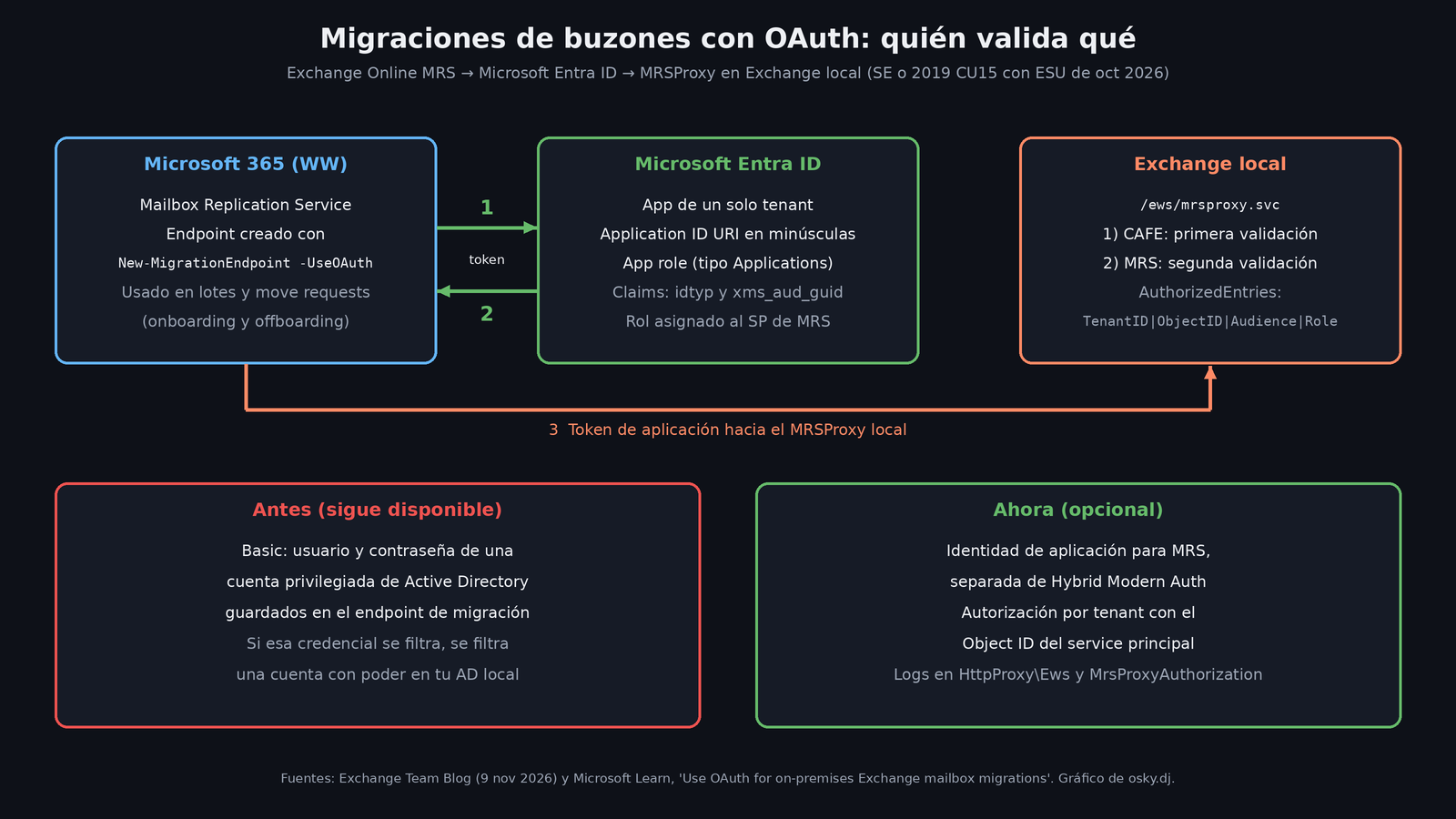
The Microsoft Learn guide clarifies something that invites confusion: this is not Hybrid Modern Authentication, the one used for users to authenticate. It's a separate model, based on an application identity, with three properties Microsoft highlights:
- a well-defined identity that represents MRS;
- separation between migration authorization and the rest of the Exchange hybrid workloads;
- tenant-specific authorization using the service principal Object ID, not a shared application ID.
The flow has three pieces. In Entra ID you register a single-tenant application that represents your on-premises MRSProxy. MRS, from Microsoft 365, requests a token for that application. And your on-premises Exchange validates that token in two layers: first the front end (CAFE) and then MRS itself, which checks a list of authorized entries.
What you need to configure
Here's a summary of the official guide so you can size up the work. I didn't test it; everything comes from Microsoft's documentation.
In Microsoft Entra ID:
- Register a single-tenant application and give it an Application ID URI that is all lowercase. Microsoft recommends the format
https://<client-id>.yourdomain.com/ews/mrsproxy.svc, although you can reuse the URI of your current endpoint. If you use the client ID in the name, you'll have to create the DNS record and cover it in your public certificate. - Remove the Microsoft Graph permissions it comes with by default and create an app role with member type Applications.
- Add the optional claims
idtypandxms_aud_guidto the access tokens (the latter by editing the manifest). - With the Microsoft Graph PowerShell module, register the Mailbox Replication Service service principal in your tenant and assign it that app role.
On-premises Exchange (on a server with the latest version), all with New-SettingOverride:
- enable OAuth on the MRSProxy with the
AuthorizedEntriesstring in the formatTenantID|ObjectID|Audience|Role. The Audience is case-sensitive and must be unique; - add your application's client ID to the audience GUID validation (
AudGuidValidation), without deleting any values that already exist; - enable OAuth authorization for MRS on the front-end servers.
In Exchange Online: you create the endpoint with New-MigrationEndpoint -UseOAuth -ExchangeRemoteMove and a -RemoteServer that matches the host of the Application ID URI. Then you test it with Test-MigrationServerAvailability.
The gotchas worth reading twice
- The test doesn't prove that much. According to the output Microsoft itself shows,
Test-MigrationServerAvailabilityonly validates that a token can be obtained; it "doesn't attempt to connect to the remote host." ASuccessthere doesn't guarantee that your MRSProxy accepts the token. - Uppercase and lowercase. The URI must be lowercase, and the Audience and Role are case-sensitive. It's the perfect recipe for an afternoon of "everything is configured correctly and it won't work."
Set-SettingOverrideoverwrites. If you modify an override, it replaces the previous parameters, so you have to set them all again.- Separate logs. CAFE writes to
Logging\HttpProxy\Ewsand MRS toLogging\MrsProxyAuthorization. Microsoft recommends enabling MRS's OAuth log during the first migrations. - Move requests. When creating a
New-MoveRequestyou must specify-RemoteHostNameequal to the URI host and-ArchiveDomainso the cmdlet picks the right parameter set.
What's still unknown
The announcement gives no dates for sovereign or government clouds. In the blog comments, an administrator asked whether the application can be limited to certain users, for example with a security group, as in cross-tenant migrations. The published guide doesn't describe that kind of scoping, and at the time of writing the question had no answer.
My take
It's a small change in the announcement and a big one in the risk model. A hybrid migration can last months, and for that whole time a password with privileges in your AD lives in the configuration of a cloud service. Replacing it with an application token, authorized per tenant and validated in two layers, reduces what you lose if something leaks.
If your migration is going to finish next week, it may not be worth it: the setup is long and Basic still works. If you're just starting or have batches to run for a while, it's worth it. And if you're still on Exchange 2019 without ESU, Microsoft's real message isn't this one: it's that you've run out of patches and need to move to SE or the cloud.
Sources
- Now available: OAuth authentication for on-premises Exchange mailbox migrations to Microsoft 365 (Exchange Team Blog)
- Use OAuth for on-premises Exchange mailbox migrations to Microsoft 365 (Microsoft Learn)
- Announcing Period 2 Exchange 2016/2019 Extended Security Update (ESU) program (Exchange Team Blog)
- Announcing Exchange 2016 / 2019 Extended Security Update program (Exchange Team Blog)
- Configure Exchange Server for Hybrid Modern Authentication (Microsoft Learn)
- Load balancing in Exchange Server (Microsoft Learn)