/en/articles/cloudflare-releases-kitesurf-its-browser-for-ai-agents-is-now-open-source
Cloudflare releases Kitesurf: its browser for AI agents is now open source

On November 13, 2026, Cloudflare open-sourced Kitesurf, its experimental browser engine built to be used by AI agents rather than people. It lives on GitHub under the Apache 2.0 license: you can read it, run it locally, modify it, and deploy it to your own Cloudflare account. It matters because until now it only existed as a managed service inside Browser Run. As of today, anyone building agents that browse can see how it works under the hood and set up their own instance, with a couple of conditions worth reading before you get too excited.
What Kitesurf is, in short
Cloudflare introduced it in August as a browser that runs entirely on Workers, its serverless platform. According to their announcement, it parses HTML, applies CSS, runs the page's JavaScript, and generates screenshots without spinning up Chromium or a browser container. It speaks the Chrome DevTools Protocol (CDP), so Puppeteer, Playwright, or chrome-devtools-mcp connect to it as if it were Chrome.
The company itself explains the design bet: an agent doesn't care about tabs, themes, extensions, or scrolling at 60 frames per second. It cares about tokens, cost, and being able to open a thousand sessions at once. Kitesurf trades visual fidelity for lower CPU and memory usage.
In September an update arrived with support for WebMCP (the standard that lets a site expose functions to agents instead of forcing them to click around), more web APIs, full compatibility with the Browser Run API, and a client that renders pages in the terminal. In that same post Cloudflare repeated that it would open-source it "soon" and that it wanted to do it right. It delivered two months later.
What's in the repository
The cloudflare/kitesurf repository includes the full engine. The README splits it into packages: engine (the Worker and the CDP server), page-script (DOM and page JavaScript), page-renderer (the one that draws), dom-shim, a Rust core for layout, painting, and JavaScript, the rasterizer, and the terminal client. The public initial commit says the earlier development history was squashed into a single one.
Internally it relies on open source Rust projects compiled to WebAssembly:
- Blitz (DioxusLabs) for HTML parsing, the DOM, layout, and painting.
- Stylo, the CSS engine that comes from Servo and Firefox.
- Boa, a JavaScript engine written in Rust. Cloudflare clarifies that it only uses it as a last resort, when the code can't run in a Dynamic Worker; the typical case is
eval(), which Workers doesn't allow natively. - The Linebender libraries (Parley, Vello, and company) for text and 2D graphics, and Krilla for generating PDFs.
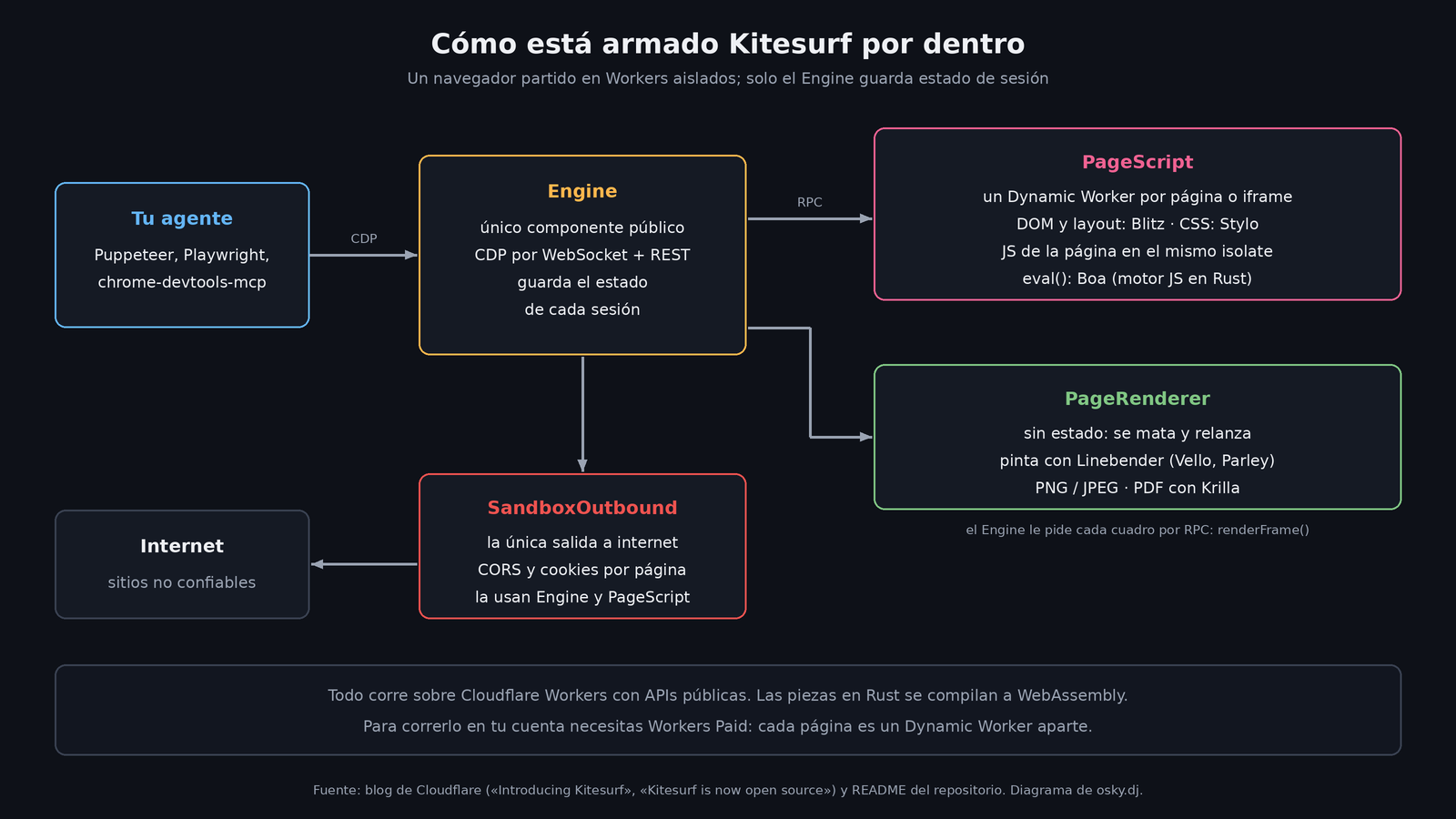
The architecture has three pieces. The Engine is the only public component and the only one that keeps session state. PageScript spins up an isolated Dynamic Worker for each page or iframe, and the site's code runs there. PageRenderer turns the scene into PNG, JPEG, or PDF and keeps no state, so the Engine can kill and relaunch it if it gets stuck. According to the original announcement, in addition, nothing touches the network directly except a Worker called SandboxOutbound, which enforces CORS, separates cookies per page, and returns a 403 to anything that doesn't meet the policy.
The numbers Cloudflare gives
In August Cloudflare published a comparison against Chromium: medians of five Quick Actions runs on Browser Run over a corpus of 14 URLs. These are the company's numbers, not an independent measurement.
| Metric | Kitesurf | Chromium (warm pool) |
|---|---|---|
| CPU, screenshot | 380 ms | 1,173 ms |
| CPU, extract HTML | 229 ms | 877 ms |
| Memory, screenshot | 57.8 MiB | 271.0 MiB |
| Memory, extract HTML | 39.4 MiB | 273.7 MiB |
| Wall-clock time, screenshot | 1,148 ms | 637 ms |
| Wall-clock time, extract HTML | 820 ms | 472 ms |
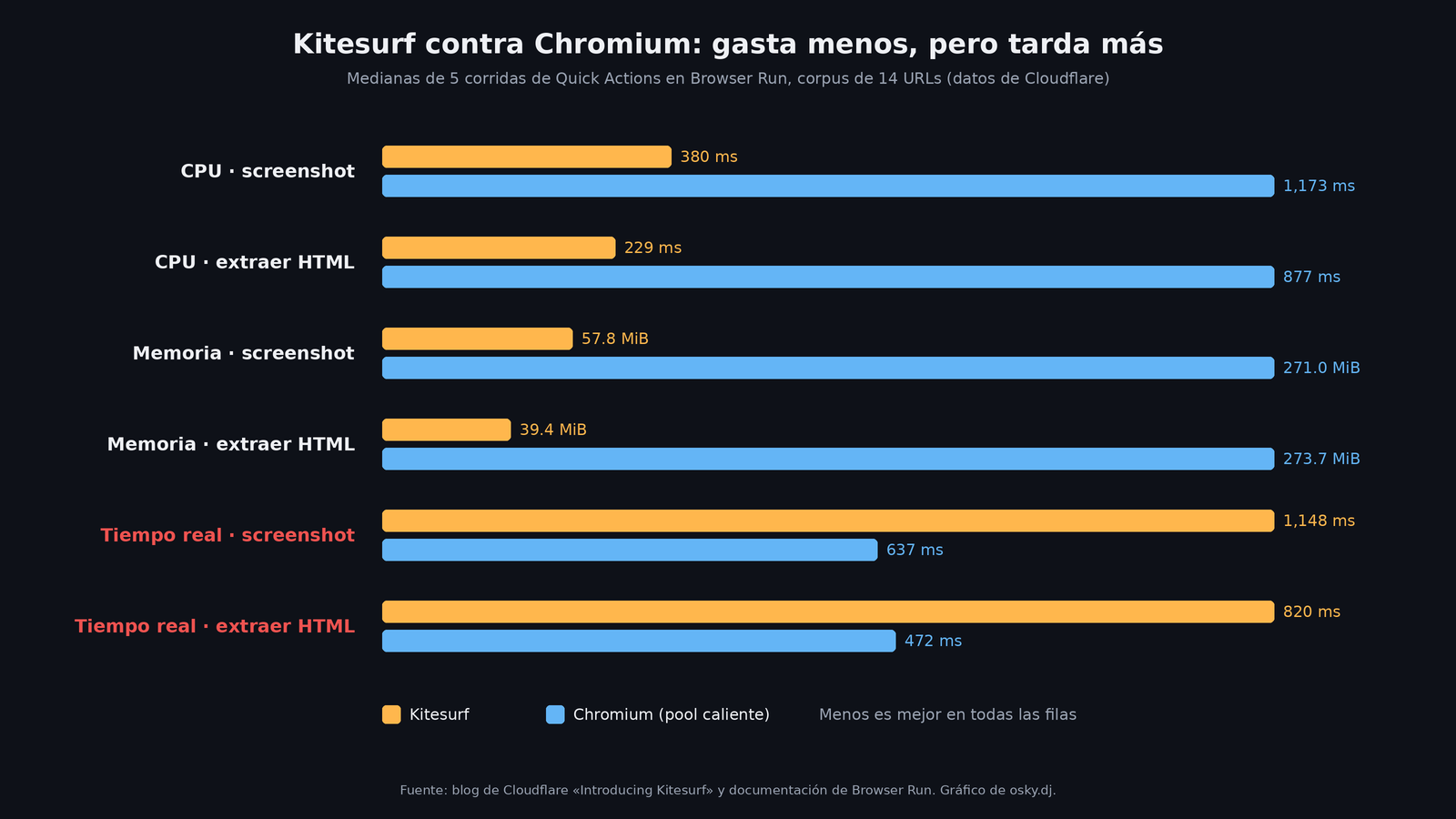
The honest reading comes from Cloudflare itself: Kitesurf wins by 3 to 7 times on CPU and memory, which is what shows up on the bill, and loses on the stopwatch by a factor of 1.7 to 1.8, because a warm Chromium with its JIT compiler beats a cold software renderer.
There's an odd detail on compatibility. In the September update Cloudflare said it passed more than 730,000 Web Platform Tests subtests. Its Browser Run documentation, updated on November 13, still says more than 235,000. My read: the number moves fast and isn't well synced. For the current figure, check the public dashboard at kitesurf.dev/wpt.
What it still doesn't do
The official documentation is clear about its limits. Kitesurf is still not the right fit if you need:
- to play video or WebGL;
- to get past an anti-bot challenge that checks the browser's real TLS fingerprint;
- to keep a long, authenticated session with persistent state.
For that, Cloudflare recommends sticking with Browser Run's default browser, which is Chromium. On the plus side, the documentation says it renders TodoMVC (vanilla, React, Vue, Angular, and Preact), Wikipedia, Hacker News, the Cloudflare blog, and a good part of its dashboard just fine.
If you're going to run it yourself
To try it locally, the README asks for Bazelisk, Node.js 22 or newer, and pnpm 9.15.4. The flow is clone, pnpm install --frozen-lockfile, and pnpm run dev, which starts the engine at 127.0.0.1:8787 with wrangler dev. The first build of the Rust core takes a while; later ones use cache. I didn't test it: this comes from the README and Cloudflare's blog.
To deploy it to your own account there are two conditions:
- You need the Workers Paid plan, because each page runs in a Dynamic Worker and that feature only exists on that plan.
- It has no authentication of its own. The README warns about it in red: without Cloudflare Access or some other layer in front, anyone with the URL can browse using your engine, hook Puppeteer up to it, send requests that go out from your account, and burn through your CPU and Dynamic Workers. And the
workers.devURL is public by default and predictable:kitesurf.<your-subdomain>.workers.dev.
The second one is what worries me most. A browser left open on the internet is a free proxy for whoever finds it, and here you're the one paying. If someone deploys it "just to test" and then goes off to lunch, they should deploy it behind Access from the start.
My take
For people building agents, the news isn't that a lightweight browser exists; you could already use that in Browser Run, and for free while it's in beta. The news is that it stops being a black box. You can audit how it isolates each page, how it filters the network, and what it does with cookies, which is exactly what matters when you give an agent access to sites you don't control.
The lock-in is also clear: the engine is designed for Workers and uses Cloudflare primitives (Dynamic Workers, RPC between Workers, Durable Objects). The code is open, but getting it off that platform is not trivial. It's open source that, in practice, nudges you toward Cloudflare.
Cloudflare welcomes contributions, but with rules: open an issue first with a minimal reproduction and wait for a maintainer's go-ahead before sending a pull request. The project, they say, is "under heavy development." Treat it as an experiment, not a production piece.